
Have you ever received a message on your phone and wondered, what does SMS mean? Maybe you saw the term in your messaging app, mobile settings, or while receiving a verification code. Although messaging apps like WhatsApp, Messenger, and Telegram dominate modern communication, SMS remains one of the most widely used messaging technologies in the world.
Every day, billions of SMS messages travel across mobile networks. Banks send account alerts through SMS. Businesses send delivery notifications. Websites send verification codes. Friends and family still exchange traditional text messages using SMS.
So what exactly is SMS, how does it work, and why is it still important today?
This guide explains everything you need to know about SMS meaning, SMS technology, SMS messaging, and how it compares to modern communication methods.
What Does SMS Mean?
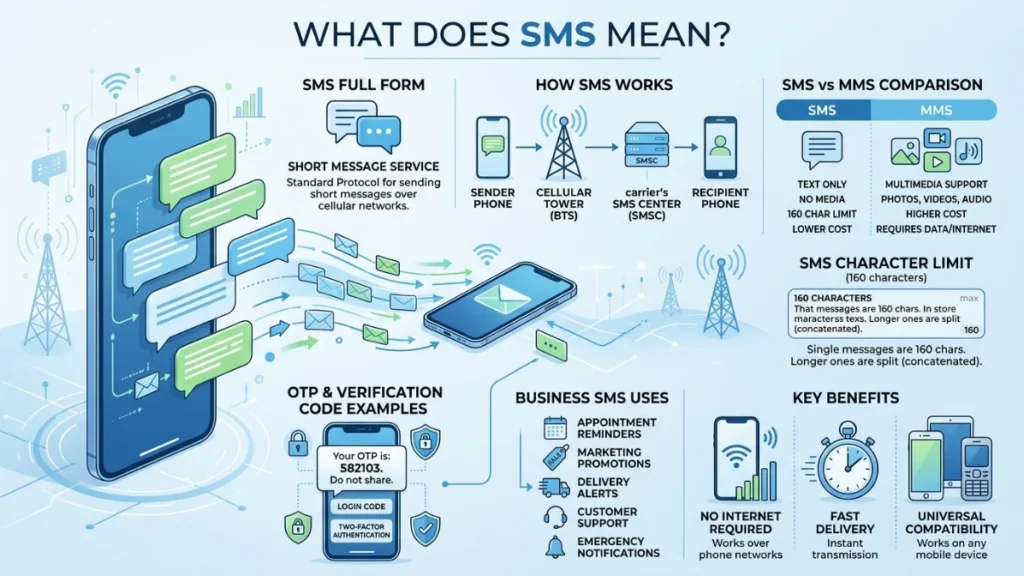
The simple answer is that SMS stands for Short Message Service.
SMS is a standard text messaging service that allows mobile devices to send and receive short text messages through cellular networks.
When people ask, what does SMS stand for in texting, they are referring to the technology behind traditional text messages.
SMS Meaning Explained
The term can be broken down into three parts:
| Word | Meaning |
|---|---|
| Short | Limited length text messages |
| Message | Written communication |
| Service | A communication system provided by mobile networks |
Together, Short Message Service describes a system designed to send short text communications between mobile devices.
Quick SMS Definition
SMS is a text messaging service that enables mobile phones to send and receive text-only messages through a cellular network.
Unlike internet-based messaging apps, SMS works directly through your mobile carrier.
SMS at a Glance
| Feature | Details |
|---|---|
| Full Form | Short Message Service |
| Message Type | Text Only |
| Character Limit | 160 Characters |
| Internet Required | No |
| Uses Cellular Network | Yes |
| Supported Devices | Almost All Mobile Phones |
| Common Use Cases | Personal texts, OTPs, alerts, reminders |
What Is SMS and Why Is It Called Short Message Service?
The meaning of SMS becomes clearer when you understand its purpose.
When mobile communication technology developed, engineers needed a way to send small amounts of text information between devices. They created a service specifically for short written messages.
That’s why it became known as Short Message Service.
Understanding the Full Form
Each word has a specific purpose:
- Short because messages were limited in length
- Message because users exchanged written information
- Service because mobile carriers provided the system
The original SMS standard allowed only 160 characters per message.
Surprisingly, this limit still influences text messaging today.
The Origin of SMS
SMS technology emerged during the development of digital cellular networks.
Key milestones include:
| Year | Event |
|---|---|
| 1980s | SMS concept developed |
| 1992 | First SMS message sent |
| Mid-1990s | SMS became available to consumers |
| Early 2000s | SMS usage exploded globally |
| Today | Billions of SMS messages sent daily |
The first SMS message reportedly contained the words:
“Merry Christmas”
That simple message launched a communication revolution.
Why SMS Became Popular
SMS solved a major problem.
People needed a way to communicate quickly without making a phone call.
Benefits included:
- Fast communication
- Low cost
- Easy to use
- Works almost everywhere
- No internet needed
These advantages helped SMS become one of the most successful communication technologies ever created.
How Does SMS Work?
Most people use SMS every day without understanding what happens behind the scenes.
The process is actually quite fascinating.
The Basic SMS Process
When you send an SMS:
- You type a message.
- Your phone sends it to your mobile carrier.
- The carrier routes it through an SMS center.
- The network locates the recipient.
- The message is delivered to their device.
The entire process usually takes only seconds.
Behind the Scenes
Several systems work together to deliver your message.
Mobile Device
Creates and sends the SMS.
Cellular Network
Transmits the message between devices.
SMS Center (SMSC)
Stores and forwards messages.
Receiving Network
Delivers the message to the recipient’s phone.
SMS Network Architecture
Sender Phone
      |
      V
Mobile Carrier
      |
      V
SMS Center (SMSC)
      |
      V
Recipient Carrier
      |
      V
Recipient Phone
This architecture allows SMS to work even when the receiving phone is temporarily unavailable.
Does SMS Require Internet?
No.
One of the biggest advantages of SMS communication is that it works without internet access.
SMS uses:
- Cellular towers
- Carrier infrastructure
- Mobile networks
Instead of:
- WiFi
- Mobile data
- Internet servers
This is why SMS often works in situations where internet-based messaging apps fail.
SMS Character Limits
Traditional SMS messages are limited to:
160 characters
If you exceed that limit, modern phones automatically split the message into multiple segments and reassemble it on the recipient’s device.
SMS Meaning on Mobile Phones
If you open your phone’s messaging app, you’re likely using SMS more often than you realize.
SMS on Android Devices
Android phones use SMS for:
- Standard text messages
- Verification codes
- Security alerts
- Carrier notifications
Most Android messaging apps automatically handle SMS in the background.
SMS on iPhones
Apple devices also support SMS.
You can often identify SMS messages by their appearance.
For example:
- Blue bubbles generally indicate internet-based messaging
- Green bubbles typically indicate SMS
This happens when messages travel through cellular networks instead of internet messaging systems.
Why Phones Still Support SMS
Despite newer messaging technologies, SMS remains important because it:
- Works on virtually every phone
- Requires no special app
- Doesn’t depend on internet access
- Supports emergency communication
That universal compatibility keeps SMS relevant.
SMS Examples in Everyday Life
Many people use SMS dozens of times each week without thinking about it.
Here are some common examples.
Personal SMS Messages
Examples include:
- “I’m on my way.”
- “See you at 7 PM.”
- “Call me when you’re free.”
- “Happy Birthday!”
These simple messages represent the most traditional use of SMS.
Business SMS Examples
Companies rely heavily on SMS communication.
Examples include:
- Appointment reminders
- Delivery updates
- Customer support messages
- Promotional offers
Verification Code SMS Messages
Almost everyone encounters OTP via SMS.
Examples include:
- Login verification codes
- Two-factor authentication
- Password reset codes
- Account security alerts
Sample SMS Messages
| Purpose | Example |
|---|---|
| OTP | Your code is 483729 |
| Banking | Your payment was successful |
| Delivery | Your order arrives today |
| Reminder | Your appointment is tomorrow |
| Personal | See you after work |
SMS vs MMS: What’s the Difference?
Many people confuse SMS and MMS.
While they are related, they are not the same.
What Does MMS Mean?
MMS stands for:
Multimedia Messaging Service
Unlike SMS, MMS can send:
- Images
- Videos
- Audio files
- GIFs
- Multimedia content
SMS vs MMS Comparison
| Feature | SMS | MMS |
|---|---|---|
| Text Messages | Yes | Yes |
| Photos | No | Yes |
| Videos | No | Yes |
| Audio Files | No | Yes |
| Character Limit | 160 Characters | Larger Capacity |
| Data Usage | Minimal | Higher |
When to Use SMS
SMS is ideal for:
- Short conversations
- Verification codes
- Alerts
- Quick updates
When to Use MMS
MMS works best when sharing:
- Pictures
- Videos
- Business media
- Visual information
For pure text communication, SMS remains the simpler option.
SMS vs Instant Messaging Apps
Messaging technology has evolved dramatically.
Today, users have many alternatives to SMS.
SMS vs WhatsApp
| Feature | SMS | |
|---|---|---|
| Internet Required | No | Yes |
| Works on Basic Phones | Yes | No |
| End-to-End Encryption | Limited | Yes |
| Multimedia Support | Limited | Extensive |
SMS vs Messenger
Messenger offers:
- Voice calls
- Video calls
- Group chats
- Rich media sharing
SMS focuses primarily on text communication.
SMS vs Telegram
Telegram provides:
- Cloud synchronization
- Large file sharing
- Advanced privacy tools
SMS prioritizes simplicity and universal reach.
Which Is Better?
The answer depends on the situation.
SMS wins when:
- Internet is unavailable
- Maximum compatibility matters
- You need reliable delivery
Messaging apps win when:
- Rich media is needed
- Group communication is important
- Advanced features are desired
Many people use both depending on their needs.
Common Types of SMS Messages
Not all SMS messages serve the same purpose.
Several categories exist.
Personal SMS
Messages exchanged between individuals.
Examples:
- Conversations
- Greetings
- Reminders
- Invitations
Transactional SMS
Transactional SMS delivers important information.
Examples include:
- Banking alerts
- Payment confirmations
- Order updates
- Shipping notifications
Promotional SMS
Businesses use promotional SMS to:
- Advertise products
- Share discounts
- Announce sales
- Promote events
Bulk SMS
Bulk SMS allows organizations to send thousands of messages simultaneously.
Common users include:
- Retail stores
- Schools
- Government agencies
- Healthcare providers
Two-Way SMS
Two-way SMS enables responses.
Example:
Business: “Reply YES to confirm.”
Customer: “YES”
The interaction continues through SMS.
International SMS
International SMS allows communication across countries and mobile networks.
Today, international texting is supported by most major carriers worldwide.
Why Businesses Use SMS Messaging
SMS has become a powerful business communication channel.
Companies continue investing heavily in SMS messaging because it delivers results.
SMS Marketing
Businesses use SMS marketing to:
- Announce promotions
- Increase sales
- Share coupons
- Drive customer engagement
Marketing messages often reach customers faster than email.
Transactional SMS
Transactional messages provide critical updates.
Examples include:
- Order confirmations
- Shipping alerts
- Account notifications
- Payment receipts
SMS Notifications
SMS notifications help businesses stay connected with customers.
- Appointment reminders
- Service updates
- Reservation confirmations
- Security alerts
Benefits of Business SMS
| Benefit | Explanation |
|---|---|
| Fast Delivery | Messages arrive quickly |
| High Visibility | Most users check texts immediately |
| Broad Reach | Works on nearly all phones |
| Reliability | Cellular networks are dependable |
| Simplicity | Easy to create and send |
These advantages explain why SMS remains a preferred communication channel for many organizations.
Advantages of SMS
SMS has survived decades of technological change for good reasons.
Works Without Internet
One of the biggest strengths of SMS is independence from internet connectivity.
This makes SMS valuable in remote locations and emergency situations.
Fast Message Delivery
Most messages arrive within seconds.
That speed makes SMS ideal for urgent communication.
Universal Compatibility
Almost every mobile phone supports SMS.
Whether someone owns a basic feature phone or a modern smartphone, SMS usually works.
Easy to Use
SMS requires minimal technical knowledge.
Anyone can send a text message within seconds.
Reliable Communication
SMS networks often remain operational even when internet services become congested.
This reliability makes SMS useful during emergencies.
Limitations of SMS
While SMS offers many advantages, it also has drawbacks.
Character Restrictions
Traditional SMS messages have limited length.
Longer messages may be divided into multiple segments.
Limited Multimedia Support
SMS supports text only.
Photos and videos require MMS or messaging apps.
Potential Costs
Depending on mobile plans, users may incur charges for SMS messages.
International texting can sometimes cost more.
Spam Messages
Unwanted marketing messages remain a challenge.
Many mobile carriers now offer spam filtering tools to reduce this issue.
Is SMS Still Relevant Today?
Some people assume SMS is outdated.
The reality is quite different.
The Rise of Messaging Apps
Apps like WhatsApp and Telegram have changed communication habits.
They offer:
- Multimedia sharing
- Group chats
- Voice calls
- Video calls
However, they haven’t eliminated SMS.
Why SMS Continues to Thrive
SMS remains essential because it:
- Reaches virtually every phone
- Doesn’t require app installation
- Works without internet
- Supports critical business communication
Industries That Depend on SMS
Many industries still rely heavily on SMS.
These include:
- Banking
- Healthcare
- Retail
- Transportation
- Government services
- Education
The Future of SMS
SMS is evolving rather than disappearing.
Modern messaging systems continue building upon SMS infrastructure while adding enhanced features.
As long as mobile phones exist, SMS will likely remain an important part of digital communication.
Frequently Asked Questions
What does SMS stand for?
SMS stands for Short Message Service.
What does SMS mean in texting?
SMS refers to standard text messages sent through cellular networks.
Is SMS the same as a text message?
In most cases, yes. Traditional text messages use SMS technology.
Can SMS work without internet?
Yes. SMS uses mobile carrier networks rather than internet connections.
What is the SMS full form?
The full form of SMS is Short Message Service.
What is the difference between SMS and MMS?
SMS supports text messages only. MMS supports multimedia content such as photos and videos.
Why do I receive verification code SMS messages?
Companies use SMS to deliver one-time passwords and security verification codes.
Can SMS be sent internationally?
Yes. Most carriers support international SMS messaging.
Is SMS secure?
SMS provides basic security but is generally less secure than encrypted messaging apps.
Why do businesses use SMS so often?
SMS offers fast delivery, broad reach, and high visibility across nearly all mobile devices.
Final Thoughts on What SMS Means
Understanding what does SMS mean is easier once you know its purpose. SMS stands for Short Message Service, a technology that allows mobile devices to exchange text messages through cellular networks.
Although messaging apps have introduced new ways to communicate, SMS remains a foundation of mobile communication. It powers verification codes, banking alerts, delivery notifications, customer updates, and everyday conversations.
Its biggest strengths are simplicity, reliability, and universal compatibility. Whether you’re using a basic phone or the latest smartphone, SMS continues to provide a dependable way to stay connected.
In short, SMS may be one of the oldest mobile messaging technologies, yet it remains one of the most useful and widely used communication tools in the world.